Your roadmap changes every week. Items move between lanes, priorities shift, new features appear, and old ones get descoped. But who changed what, and why? Until now, the answer lived in Slack threads, meeting notes, and people's heads. Not anymore.
Introducing the Activity Feed — an AI-powered, always-on changelog that captures every mutation to your roadmap automatically. No manual logging. No discipline required. Just open the Activity tab and see exactly what happened, when it happened, and what changed.
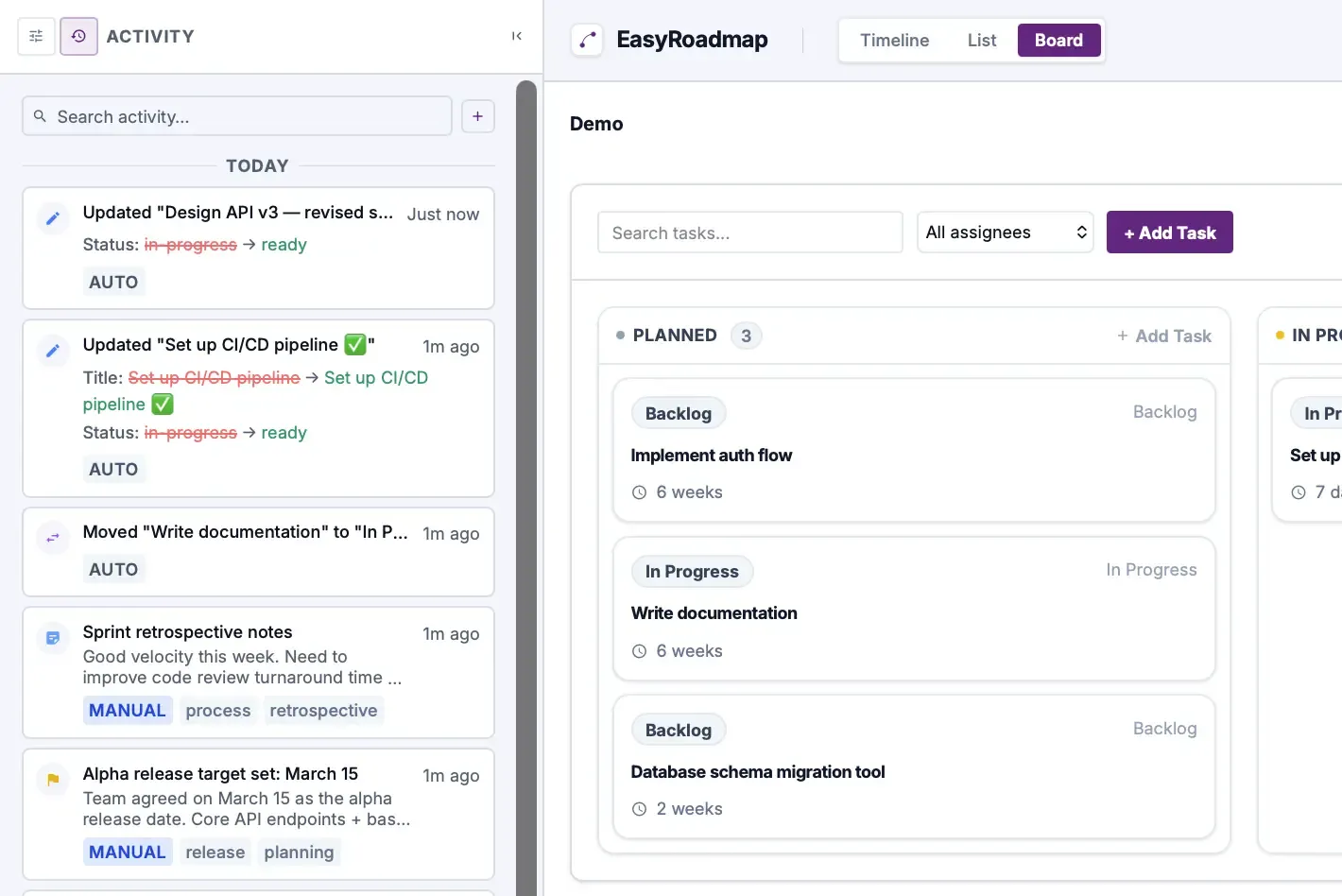
AI meets roadmap management
The Activity Feed uses intelligent change detection to capture not just what changed, but the meaningful context around it. Status transitions, field-level diffs, and structural changes are all tracked with zero configuration. Think of it as an AI co-pilot that never forgets to update the changelog.
What gets tracked — automatically
Every action in your roadmap generates an activity entry. The AI engine analyzes each change and produces human-readable descriptions with precise before/after diffs:
- Item created: "Created 'Set up CI/CD pipeline' in Backlog" — with full item details.
- Item updated: "Updated 'Design API v3'" — showing exactly which fields changed
(e.g., status:
planned→in-progress). - Item moved: "Moved 'Write documentation' from Backlog to In Progress" — lane transitions captured with source and destination.
- Item deleted: Full record preserved so you never lose track of removed work.
- Lane changes: Structural modifications to your board are logged too.
Key features
AI-powered auto-logging
Every change — new items, status updates, lane moves, renames — is captured automatically with zero manual effort.
Intelligent change diffs
See exactly what changed: old value → new value. No more guessing what "updated task" actually means.
Decision & milestone tracking
Log architectural decisions, milestone completions, and team notes directly in the activity feed.
Smart search & filtering
Find any change instantly. Search across all activity types, descriptions, and change details.
Full API access
Every activity entry is available via the REST API — build custom dashboards, Slack bots, or CI/CD integrations.
Mobile-ready
Access the activity feed from any device. The responsive design works beautifully on phones and tablets.
How it works
Automatic mutations
Item created, updated, moved, or deleted — every change to your roadmap is logged with full context.
Lane operations
When you add or remove a lane, the activity feed captures the structural change with details.
Manual entries
Add notes, decisions, and milestones directly from the Activity panel — or via the API.
API-driven events
Activities created through the API are tagged with a "api" badge so you know the source at a glance.
The AI advantage
Traditional changelogs are manual, inconsistent, and always out of date. The Activity Feed flips this on its head with intelligent automation:
AI-native architecture
The Activity Feed is designed from the ground up for the AI era. Every entry is API-accessible, making it trivial to connect AI agents, LLM-powered workflows, and automated reporting tools. Imagine an AI that reads your activity feed every morning and posts a summary to Slack — that's not a future feature, it's possible today with a few lines of code.
- Zero-effort logging: No buttons to click, no forms to fill out. Every change is captured by the AI engine the moment it happens.
- Smart diffs: The system intelligently compares old and new values, surfacing only meaningful changes. Renamed a task? You'll see the old name and the new name side by side.
- Source attribution: Every entry shows whether it came from the UI or the API, so you know if a human or an AI agent made the change.
- Contextual grouping: Activities are automatically grouped by date with smart relative timestamps ("2 minutes ago", "yesterday") that keep the feed scannable.
Full API access
The Activity Feed isn't just a UI feature — it's a fully programmable changelog with REST API endpoints:
 GET /api/v1/workspaces/:id/activity — List all activity
 GET /api/v1/workspaces/:id/activity/summary — AI-ready summary
 POST /api/v1/workspaces/:id/activity — Add manual entries
 PATCH /api/v1/workspaces/:id/activity/:activityId — Update entries
 DELETE /api/v1/workspaces/:id/activity/:activityId — Remove entries
This opens up powerful integration possibilities:
- Build a Slack bot that posts daily roadmap change summaries to your team channel.
- Connect AI agents (GPT, Claude, custom LLMs) to log decisions and milestone completions.
- Create CI/CD hooks that post deployment events directly to your roadmap's activity feed.
- Build custom dashboards that visualize roadmap velocity and change patterns over time.
Use cases
Sprint retrospectives
Review what changed during a sprint without relying on memory. The activity feed is your objective changelog.
Stakeholder updates
Share a link to the activity feed instead of writing status reports. Let the data speak for itself.
Async team coordination
Distributed teams can see exactly what happened overnight — no standup required.
Audit & compliance
Every change is timestamped and attributed. Perfect for teams that need traceability.
AI agent integration
Connect your AI agents to the API and let them log decisions, updates, and progress automatically.
CI/CD pipeline events
Post deployment milestones and release notes directly to your roadmap activity feed via the API.
Built for the agentic future
We believe the future of product management is agentic. AI agents will update roadmaps, log decisions, track dependencies, and surface risks — all without human intervention. The Activity Feed is the foundation for this future.
Every activity entry follows a structured schema with types, timestamps, descriptions, and optional change details. This makes it trivial for AI systems to read, write, and reason about your roadmap's history. Whether you're building a custom AI workflow or connecting to an existing automation platform, the Activity Feed speaks the language of machines while remaining beautiful for humans.
Getting started
The Activity Feed is available now for all EasyRoadmap workspaces. Here's how to access it:
- Desktop: Click the history icon in the left sidebar to switch from Settings to Activity.
- Mobile: Tap the Activity button in the mobile menu to open the feed.
- API: Use your API key to query
GET /api/v1/workspaces/:id/activityfor programmatic access.
Start making changes and watch the activity feed fill up automatically. Add a note, log a decision, or just let the AI do the work — your roadmap's history is now always up to date.